
wed.rovty.com
One link your guests will actually open.
A designed invitation page, guest list, WhatsApp sending, RSVPs and seating, all in one place, styled exactly like your wedding. One payment, per wedding.
On this page
01Fourteen designs
Each one has its own hero layout, its own typeface and its own opening animation. A Poruwa invitation is not the Chapel one in different colours.
02Build yours now
Try your details and a few styles below. Nothing is saved. For complete layouts and customization, open the template studio.
Step 01: Your details
Step 02: Pick a design
Every design changes the layout, the type and the opening animation, not just the colour. Classic: Rose & gold, soft cards, falling petals.
Together with their families
Amara&Kavin
Sunday, 14 February 2027
Save the date
The Celebration
Your seating
Find your table
Enter your codeThank you for being part of our story
Scroll inside the phone. This is the real invitation layout, with an example couple, not a real wedding.
03What’s included
04Four steps, then you’re sending
Choose a design
Pick from 14 templates and add your names, date, venue and photos.
Add your guests
Add your guest list, and Rovty Wed builds each guest their own personalised link.
Send on WhatsApp
Select guests and send their personalised links straight from your dashboard.
Watch it come together
RSVPs and seating fill in live in your admin as guests reply.
05No one asks where they’re sitting
Because nobody has to search. The personalised link you send each guest opens their invitation with their table already on it.
Guest side
Their link already knows who they are
Every guest gets their own personalised link on WhatsApp. It opens the invitation with their name on it and their table already on the page: nothing to type, nothing to remember at the door.
Open a guest’s link
Welcome, Mrs. Nimali Perera
Grand Ballroom · near the band
You’re seated with
- Mr. & Mrs. Perera
- Mrs. Nimali PereraYou
- Dr. Sunil Perera
- Ms. Tharushi Perera
- Mr. Ravi Jayasuriya
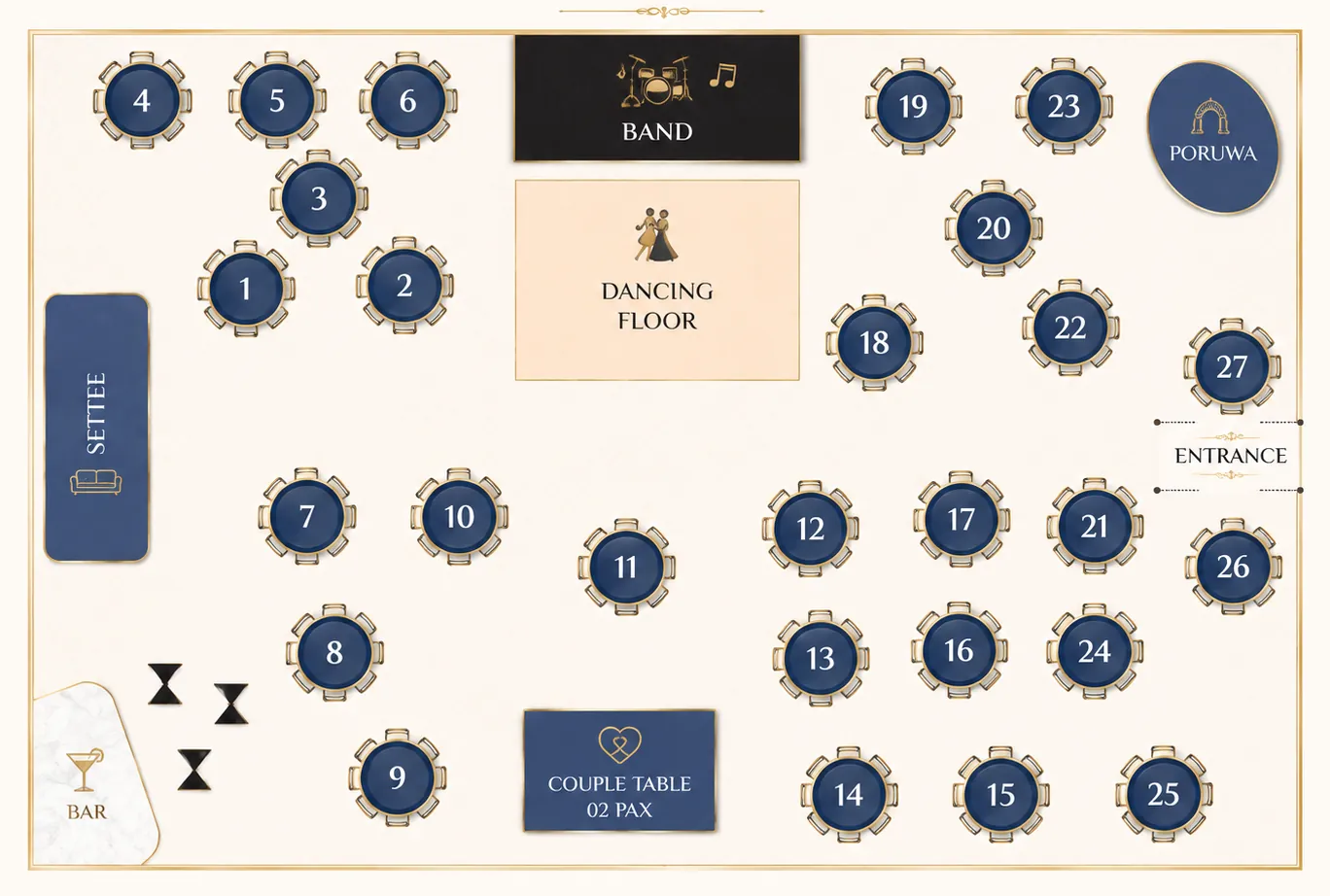
Their table is marked on the hall plan.
06Your dashboard
Couple side
Your dashboard does the chasing
The same screen you’ll live in for the month before the wedding: who hasn’t been sent an invitation, who hasn’t replied, who’s accepted but has no table yet.
- 01Add guests once: each one gets a code and a personal link automatically.
- 02Send on WhatsApp from the dashboard, one prefilled chat at a time.
- 03RSVPs land here as guests reply, with seat counts attached.
- 04Lay out tables, assign guests, publish the seating plan when you’re ready.
Next up
3 open07One payment, per wedding
No subscription and no per-guest fee. Hosting is included for the period shown with each plan.
Essential
For couples who want a beautiful digital wedding invitation.
Choose Essential- All wedding templates
- Wedding website and custom invitation link
- Colors, typography and section customization
- Online RSVP and guest management
- Personalized invitations and WhatsApp sharing
- Photo galleries and multiple events
- Maps, countdown and mobile layouts
- Standard support
Complete
Most popularEverything you need to invite, manage, and arrange your guests.
Choose Complete- Everything in Essential
- Seating planner and table assignments
- Find Your Seat for guests
- Shared wedding team access
- Admin and viewer team permissions
- Priority support
Studio
For couples who want a completely personalized wedding experience.
Choose Studio- Everything in Complete
- Custom canvases with text, photos and shapes
- Layers, alignment and responsive canvas layouts
- Bespoke design assistance from the Rovty team
- Custom domain setup with the Rovty team
- Dedicated support
08Questions couples ask
01Do our guests need to install anything?
No. The invitation is a web page that opens in WhatsApp's browser, Safari or Chrome. Guests RSVP on the page itself, with no account and no app.
02How do the personalised links work?
When you add a guest, Rovty Wed builds them their own link. Sending from your dashboard opens WhatsApp with that guest's link pre-filled, one chat at a time, and marks them as sent.
03Do guests have to look up their table?
No. Their personalised link opens the invitation with their name and their table already on the page, along with who else is on that table and where it sits on the hall plan. You publish the seating only when you're ready.
04Is it really one payment?
Yes. One-time, per wedding: Choose Essential, Complete or Studio. See current prices and hosting periods in the plans section.
05Can we use our own domain?
Custom domains are part of the Studio plan. Every other plan gets a link on wed.rovty.com, for example wed.rovty.com/amara-kavin.
06What if details change after we've sent invitations?
Edit them in your dashboard. The invitation link stays the same, so the page your guests already have updates itself, and guest notifications keep everyone informed of the change.
07Do you work with wedding planners?
Yes. If you're arranging invitations for several weddings, message us on WhatsApp and we'll set you up per event.
Talk to a human
Send us your date on WhatsApp.
Tell us your names, your date and which design you liked. We’ll set the invitation up and send you the link to check before anything goes out to your guests.
Already set up? Sign in to your dashboard.